Popup SMS1.0.3
Publisher Description
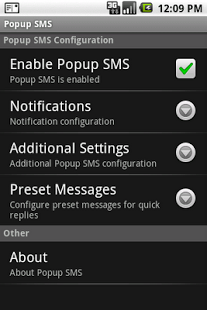
Popup SMS brings you cool UI, fast and convenient SMS experience. Popup SMS provides a convenient popup dialog when a message is received that allows you to quickly read and reply or forward or call to messages. Quickly read and reply or forward or call to SMS messages from a convenient popup window. It also provides in-depth customization of message notifications including contact specific sound, vibrate and LED settings. Popup SMS is a tiny application, which is receiving SMS messages as a notification with popup. Have a useful experience with Message Popup. Similar to the SMS Popup app - but is faster, looks better, and is a pleasure to use.
Full feature list:
- Convenient popup window on incoming message
- Quickly reply, delete, forward, call or close the message
-Customize notifications including sound, vibrate pattern, LED color (if available).
-Also customize notifications for individual contacts
-Setup notification reminders (repeating notifications if you miss the first one)
-Optional privacy mode to hide sender name and message contents
Developed by :
- Mitul Nakum
- Sanjay Patel
- Pravin Dodia
www.proideaclub.in
About Popup SMS
The company that develops Popup SMS is Rultech Solutions Private Limited. The latest version released by its developer is 1.0.3. This app was rated by 9 users of our site and has an average rating of 2.6.
To install Popup SMS on your Android device, just click the green Continue To App button above to start the installation process. The app is listed on our website since 2013-08-07 and was downloaded 295 times. We have already checked if the download link is safe, however for your own protection we recommend that you scan the downloaded app with your antivirus. Your antivirus may detect the Popup SMS as malware as malware if the download link to com.proideaclub.popupsms is broken.
How to install Popup SMS on your Android device:
- Click on the Continue To App button on our website. This will redirect you to Google Play.
- Once the Popup SMS is shown in the Google Play listing of your Android device, you can start its download and installation. Tap on the Install button located below the search bar and to the right of the app icon.
- A pop-up window with the permissions required by Popup SMS will be shown. Click on Accept to continue the process.
- Popup SMS will be downloaded onto your device, displaying a progress. Once the download completes, the installation will start and you'll get a notification after the installation is finished.
Program Details
System requirements
Download information
Pricing
Version History
version 1.0.3
posted on 2013-08-07
version 1.0.2
posted on 2011-05-25
Several fixes and updates
